Bring Your Designs to Life with the Birthday Clipart Set
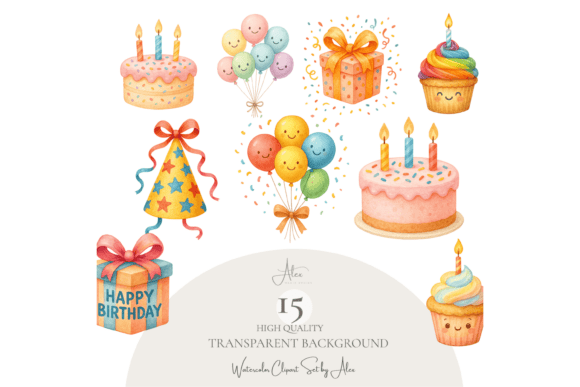
Creating eye-catching, professional designs for birthdays doesn’t have to be time-consuming or complicated. The Birthday Clipart Set offers a collection of 15 high-quality PNG files featuring beloved birthday elements like cakes, balloons, party hats, and gifts. Designed with a transparent background and rich detail, this set is ideal for digital and print projects ranging from greeting cards to social media posts.
Why the Birthday Clipart Set Stands Out
Whether you're a seasoned designer or just starting out, the Birthday Clipart Set is a versatile tool that simplifies the creative process. Each image is professionally painted and saved at 216 DPI, ensuring crisp, clear results whether you're printing posters or designing digital scrapbooks. The transparent background makes it easy to layer elements over different colors and textures without the hassle of background removal.
Common Mistakes When Choosing and Using Clipart Sets
While clipart sets like this one offer great value, there are several common mistakes users make that can impact the quality and effectiveness of their final designs.
1. Overlooking File Format and Resolution
One of the most frequent errors is not checking the file format and resolution before downloading. Some clipart sets are saved in low-resolution formats like JPEG, which can appear pixelated when scaled up. The Birthday Clipart Set avoids this issue by offering PNG files at 216 DPI, which maintain clarity at any size. Always confirm that the files you're purchasing are suitable for both screen and print use.
2. Ignoring Licensing Details
Many users are surprised to learn that not all clipart is licensed for commercial use. Fortunately, the Birthday Clipart Set includes a commercial license, allowing you to use the graphics in both digital and physical products for sale. However, you cannot resell or redistribute the original files themselves. Always read the licensing agreement carefully to avoid legal issues later.
3. Using Too Many Elements at Once
It's tempting to use all the graphics in a set, especially when they're as charming as these birthday elements. But overcrowding a design can make it look cluttered and unprofessional. A better approach is to select 2–3 key graphics—like a cake, a balloon, and a gift—and build your layout around them. This keeps your design focused and visually appealing.
4. Forgetting to Match the Style to the Project
Not every birthday clipart set works for every occasion. The Birthday Clipart Set has a whimsical, hand-painted style that works well for children’s parties, baby showers, or casual celebrations. However, if you're designing for a more formal milestone like a 50th birthday, you may want to pair these graphics with more elegant fonts and color schemes to maintain a cohesive look.
How to Use the Birthday Clipart Set Effectively
To get the most out of this set, consider the following tips and best practices:
- Test on different backgrounds: Since the clipart has a transparent background, try placing it on light, dark, and patterned backgrounds to see how it looks in various contexts.
- Scale thoughtfully: While the images are high resolution, extreme resizing can still affect clarity. Avoid stretching them too far beyond their original size.
- Combine with coordinating fonts: Pair the clipart with fonts that match the playful tone—think rounded sans-serif or hand-lettered styles for invitations and greeting cards.
- Use in layered designs: Because the backgrounds are transparent, you can layer multiple elements without them clashing. Try placing a balloon behind a cake graphic for a sense of depth.
What to Check Before Downloading or Using the Birthday Clipart Set
Before you make your purchase or begin designing, take a few moments to verify the following details:
- File type: Confirm you're getting PNG files with transparent backgrounds, not JPEG or BMP formats that may have visible backgrounds or lower quality.
- Resolution: Look for 300 DPI or higher for print projects and at least 150 DPI for digital use. The Birthday Clipart Set exceeds this with 216 DPI clarity.
- License type: Ensure the set includes a commercial license if you plan to use the graphics in products for resale or client work.
- Compatibility: If you're using design software like Canva, Procreate, Photoshop, or Cricut, confirm the files are compatible. PNG files work universally across most platforms.
Real-World Examples of the Birthday Clipart Set in Action
Let’s look at a few practical applications where this clipart set shines:
- Party invitations: Use the balloon and gift graphics to frame text on a digital invite. Pair with a soft pastel background for a sweet, celebratory feel.
- Planner stickers: Resize the cupcake and party hat graphics to create cute, printable planner stickers for personal or commercial use.
- Wall art: Combine a large cake graphic with a “Happy Birthday” typographic design for a printable nursery or party room poster.
- DIY crafts: Incorporate the clipart into sublimation designs for custom mugs, shirts, or tote bags that celebrate birthdays with style.
Final Thoughts: Make the Most of Your Birthday Clipart Set
The Birthday Clipart Set is more than just a collection of cute graphics—it’s a powerful design resource that can elevate your creative projects when used wisely. By avoiding common pitfalls like ignoring licensing terms, using too many elements at once, or not checking file quality, you’ll ensure your final designs look polished and professional.
Always take a moment to preview how each graphic looks in your layout before finalizing. And remember, the best designs often come from thoughtful restraint—choosing just the right elements to convey the joyful spirit of a birthday celebration.